Ready-Made LinkedIn and X Posts for Every Drupal Article, With AI Automators
Writing a blog post is half the work. The other half is telling people about it, and that is the half that usually gets skipped. So I made my Drupal site do the first draft: every article now comes with a LinkedIn post and an X post, ready to copy, sitting at the bottom of the edit form.
It took two fields, two AI Automators per content type, and about sixty lines of custom code. Here is how it works, the three things that went wrong on the way, and, at the end, every AI module this site runs and what each one is for.
What it does
- Every blog post, page, video and event has two new fields: LinkedIn post (ready to copy) and X post (ready to copy).
- They are written by AI when the content is first saved, and rewritten whenever the body changes.
- Each ends with the page's real public URL, which updates if the title (and so the alias) changes.
- The X post always fits X's 280-character limit, link included.
- Only people who can edit the page can see them. They never render on the site.
- If I edit a draft by hand, my edit is kept unless the body changes.
1. Two plain text fields
Both are string_long fields (Text (plain, long)), shared across the four content types, shown on the form as a textarea at the bottom and hidden on every view display. Plain text matters: LinkedIn and X do not take HTML, and you want to copy exactly what you see.
2. One AI Automator per field
The AI module's AI Automators submodule fills a field from a prompt when an entity is saved. Each social field gets an automator with:
- Rule: LLM: Text (simple), which writes plain text into a
string_longfield. - Input mode: base, with body as the base field, so the prompt receives the article as
{{ context }}. - Edit mode: on. This is the important setting. With it on, the automator runs when the field is empty or when the body has changed since the last save. With it off, it only fills an empty field, so the post would go stale the first time you revised the article.
- Worker: direct, so the drafts are there as soon as the save finishes.
The prompts do most of the work. A few rules made the biggest difference:
- "Work only from the content. Never invent facts, numbers, results, names or claims." Without it, the model happily adds statistics the article never mentions.
- For LinkedIn: open with a line that works as a hook on its own, because LinkedIn hides everything after about 200 characters.
- For X: a hard limit stated in characters, one clear point, at most two hashtags.
- "Do not include any link or URL; it is added automatically." More on why below.
3. Adding the link in code
A model guessing your URL will get it wrong, and a brand-new node does not have a URL yet anyway. So the prompts say "no link", and a hook_entity_presave() in a small custom module adds it. AI Automators also works in presave, and because ai_automators sorts before my module, its text is already in the field when my hook runs.
The hook strips any link left over from a previous save, trims the X post, and appends the current URL:
// Drop a link left by an earlier save.
$text = trim(preg_replace('~\s*https?://\S+\s*$~u', '', $text));
// X counts any link as 23 characters, and it sits on its own line:
// 280 - 23 - 2 leaves 255 for the post itself.
if ($field === 'field_social_x') {
  $text = _trim_to_words($text, 255);
}
$node->set($field, $text . "\n\n" . $url);
Models count characters badly, even when you write "HARD LIMIT" in capitals, so the length is enforced in code. Trim at a word or sentence boundary, never mid-word.
4. Working out the URL before the node exists
This is where it got interesting. My aliases come from Pathauto patterns like /blog/[node:title]. Pathauto creates the alias after the node is saved, so in presave a new node has no alias, and PathautoGenerator::createEntityAlias($node, 'return') does not help either: it needs the node's own URL first, which a node without an ID does not have.
The fix is to do what Pathauto would do: load the pattern for the entity, replace its tokens with Pathauto's cleaning callback, and clean the result.
$pattern = \Drupal::service('pathauto.generator')->getPatternByEntity($node);
$cleaner = \Drupal::service('pathauto.alias_cleaner');
$alias = \Drupal::token()->replace($pattern->getPattern(), ['node' => $node], [
  'clear' => TRUE,
  'callback' => [$cleaner, 'cleanTokenValues'],
  'pathauto' => TRUE,
]);
$alias = $cleaner->cleanAlias($alias);
$url = Url::fromUri('base:' . ltrim($alias, '/'), ['absolute' => TRUE])->toString();
Note the last line. My first version used Url::fromUserInput($alias), which worked for new nodes and failed for existing ones: Drupal matched the existing alias back to its route and, with outbound path processing off, printed /node/88. A base: URI is not routed, so it comes out exactly as built.
5. Keeping the drafts private
Hiding a field on every view display keeps it off the page, but not out of JSON:API, REST or Views. A hook_entity_field_access() closes that: the two fields are only visible to someone who can update the node, or for a new node, someone with access content overview.
The gotcha that broke my API saves
When you add the first automator to a bundle, AI Automators adds a hidden ai_automator_status field to it, marked required with a default of pending. Defaults only apply to new entities, so every existing node had no value in it.
Saving through the edit form was fine, because the form only reports violations for fields it displays. But anything that validates the whole entity, such as a REST or JSON:API PATCH, or an MCP server editing content, failed with "ai_automator_status: This value should not be null" on every node that existed before the automator.
The fix was to make that field not required. AI Automators only checks that the field exists, not whether it is required, so this changes nothing about how it works. If you add automators to a site with existing content and save it programmatically, check this first.
Every AI module this site runs, and why
The social drafts are one small piece. This is the whole AI setup behind fernandesjoshua.com, a personal Drupal site, with the reason each module is there.
The foundation
- AI (core module). One common layer for every AI call on the site. Features ask for an operation such as chat or text-to-image, and the AI module sends it to whichever provider is configured. Nothing else on this list talks to an AI vendor directly.
- Four providers: Anthropic, OpenAI, Google Gemini and OpenRouter. Each is its own provider module, with its API key stored through the Key module rather than in configuration. Different jobs suit different models, and having four means no single outage takes AI off the site.
- A small custom failover module. If a chat request fails, it is retried against the next provider in a configured chain: OpenRouter, then Gemini, then OpenAI, then Anthropic. Image generation falls back from OpenAI to Gemini. Editors never see a provider error.
- AI Metering. Records token usage and cost per request, with per-model pricing, so I know what each feature actually costs before it surprises me.
For writing and publishing
- AI Automators. Sixteen automators across four content types: SEO meta tags (title, description, keywords and Open Graph tags) written from the body whenever they are empty; the LinkedIn and X drafts from this post; and an on-demand header image generator, run manually so it never spends money unasked.
- AI CKEditor. An AI button in the editor toolbar that drafts text from a prompt, rewrites a selection to an instruction, fixes spelling and grammar, summarises, and tidies HTML.
- AI Content Suggestions. Checks on the edit form for readability, tone, a suggested summary, suggested titles and suggested tags.
- AI Image Alt Text. Writes alt text with a vision model as soon as an image is uploaded. I review it before saving. It makes the site more accessible and helps image search.
For the research side
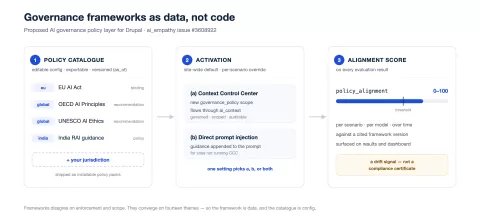
- AI Empathy Evaluation. My own module. It runs ethically difficult scenarios through AI models and scores their answers for empathy, reasoning and consistency, and now for alignment with governance frameworks such as the EU AI Act and India's AI Governance Guidelines. The site's public empathy assessment is built on it and compares visitors' answers with how the models responded.
- Context Control Centre (
ai_context), with AI Agents. Manages reusable context that is added to AI requests by scope. AI Empathy uses it to deliver governance policies into evaluations as editable context items.
For managing the site with AI
- MCP Server, with the Tool API bridge. Exposes a small set of content tools over the Model Context Protocol, so an AI assistant can draft and edit content directly. It runs as a dedicated user with a narrow role: it can create and edit content, but anything new it creates is saved unpublished, every save is a new revision, and it cannot delete or publish anything. A person always presses publish. This post was drafted that way.
The common thread: AI does the first draft, the repetitive checks and the measuring. A person still decides what goes live.
Was it worth it?
Yes. Here is the X draft it wrote for my post about judging a 24-hour hackathon, unedited:
Judged Odyssey 2026, a 24-hour hackathon at PCCE Verna. The best teams were not the ones with polished demos but the ones who could explain what they cut and why. That skill matters more than the code.
It is not always that good, and I still read every draft before posting. But starting from a solid draft instead of a blank box is the difference between sharing a post and meaning to.
If you want something similar on your Drupal site, or a hands-on Drupal AI workshop for your team, get in touch.