Digital Locker for Drupal: Issue Signed Certificates to DigiLocker and Accept Documents From It
Every year, institutions across India print, stamp and post millions of certificates: marksheets, degree certificates, course completion certificates, licences, permits. And every year, the people who receive them have to scan, photocopy and attest those same papers again and again for admissions, jobs and applications.
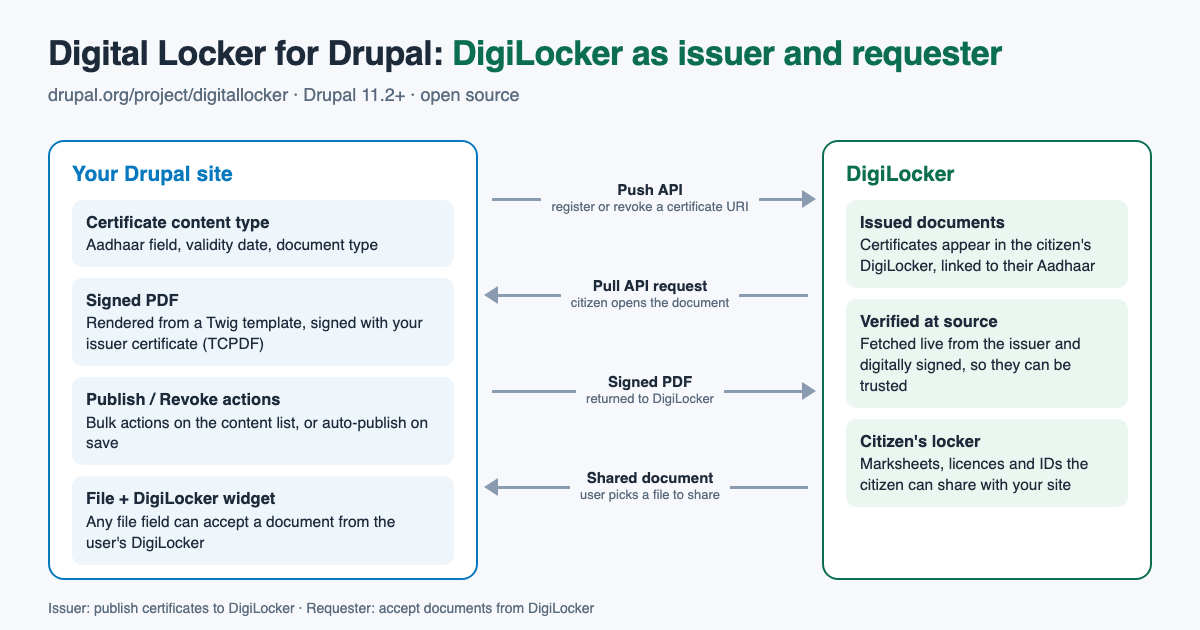
DigiLocker, India's national document wallet, solves both halves of that problem. An issuer publishes a document once, digitally signed, and it appears in the citizen's DigiLocker. A requester asks the citizen to share a document from their DigiLocker, and receives the original, fetched from the issuer, instead of a scan that has to be checked by hand.
Digital Locker is the Drupal module that lets a Drupal site play either role. Here is what it does, who it is for, and where I want to take it next.
A little history
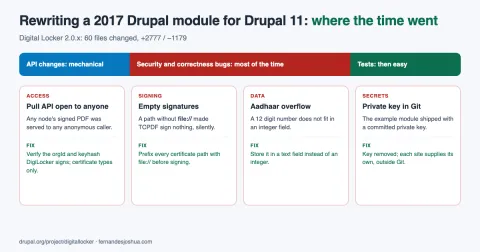
The module was started in 2017 by Alan Lobo, who built the first Drupal 8 version with both the issuer and the requester. I joined as a co-maintainer, and in 2026 I rewrote it for Drupal 11 on the new 2.0.x branch: modern Drupal APIs, dependency injection, OOP hooks, a security review of every endpoint, automated tests, and a GitLab CI pipeline with PHPStan, PHPCS and spell checking.
What is inside
The project is a suite of three modules. Enable only the ones you need.
| Module | What it does |
|---|---|
| Digital Locker Issuer | Turns content into digitally signed PDF certificates, registers them with DigiLocker, and serves them when a citizen opens one. |
| Digital Locker Requester | Adds a "File + DigiLocker" widget, so a user can attach a document from their own DigiLocker to any file field. |
| Digital Locker Issuer Example | A worked example of customising the certificate layout and drawing on the PDF in code. |
Who can use it
As an issuer, any organisation that already keeps its records in Drupal and is onboarded as a DigiLocker issuer:
- Universities, colleges and schools issuing marksheets, degree certificates, transfer and migration certificates.
- Training institutes and course providers issuing completion and skill certificates that employers can trust without a phone call.
- Government departments and local bodies issuing licences, permits, registrations and no-objection certificates.
- Professional bodies and councils issuing membership and registration certificates.
As a requester, any Drupal site with a form that asks people to upload documents:
- Admission and scholarship portals that need marksheets and identity documents.
- Recruitment and job application forms.
- Licence, permit and grievance applications on government portals.
- Verification or onboarding steps that would otherwise rely on photocopies.
Both roles need onboarding through the DigiLocker partner portal, which issues the credentials the module asks for.
How the issuer works
- Mark a content type as a certificate type. Each content type gets a Digital Locker Settings tab. Choose the field that holds the recipient's Aadhaar number, the field that holds the validity date, and the DigiLocker document type.
- Generate the certificate. A node is rendered into a PDF through a Twig template and the TCPDF module, then digitally signed with the certificate DigiLocker issued to you.
- Publish it. Use the Publish to Digital Locker action on the content list (one or many at once), or turn on auto-publish so certificates are pushed when they are saved. The Push API registers the document's URI against the recipient's Aadhaar.
- Serve it. When the citizen opens the document in DigiLocker, DigiLocker calls the module's Pull API, which authenticates the request and returns the signed PDF, generated fresh from the current content.
- Revoke it. The Revoke from Digital Locker action withdraws a certificate if it was issued in error.
Document URIs come from the URL alias, so the module uses a Pathauto pattern that includes your issuer ID and a random hash, which keeps URIs unique and unguessable. The site's status report flags every configuration problem it finds, such as a missing credential, a signing certificate inside the web root, or a Pathauto setting that would rewrite aliases.
How the requester works
Switch any file field's form display to the File + DigiLocker button widget. The field gains a button that opens DigiLocker's share dialog. The user signs in to DigiLocker, picks a document, and the module fetches it server side and attaches it to the field like any other upload. You can also limit the field to DigiLocker documents only, so nobody can upload an edited scan instead.
The DigiLocker script is loaded only on pages that actually show the widget, and the callback requires both a permission and a CSRF token.
Getting started
Version 2.0.x needs Drupal 11.2 or later and PHP 8.3 with the gd and openssl extensions.
composer require drupal/digitallocker:2.0.x-dev
drush en digitallocker_issuer    # and/or digitallocker_requester
Then enter your credentials at /admin/config/services/digitallocker/issuer (or /requester), store the signing certificate outside the web root, and check /admin/reports/status. For local development you do not need real credentials to see a signed PDF: the example module's README shows how to generate a throwaway self-signed certificate.
Making the certificate look like yours
- Override
digitallocker-certificate.html.twigin your theme, ordigitallocker-certificate--BUNDLE.html.twigfor one certificate type. - Configure the Digital Locker certificate view mode to control exactly which fields appear.
- Implement
hook_digitallocker_issuer_document_alter()to draw directly on the PDF, for logos, seals or QR codes, before it is signed.
Future scope
The 2.0.x branch is under active development and does not have a tagged release yet. Here is where I want to take it:
- A first release. Tag 2.0.0-alpha1, test it end to end against the DigiLocker sandbox, then move towards a stable release with security advisory coverage.
- Protecting Aadhaar numbers. Certificate types store the recipient's Aadhaar number today. I want to add masking and encryption for that field, and guidance on retention, to fit India's Digital Personal Data Protection Act.
- Verification on the PDF. A QR code and a public verification page, so anyone holding a printout can confirm it is genuine.
- More than nodes. Issue certificates from other entities, such as webform submissions or course completions, not only from content.
- No-code workflows. ECA events and actions, so a certificate can be issued automatically when a learner passes a course or an application is approved.
- A Drupal recipe. A one-step recipe that sets up a ready-made certificate content type, Pathauto pattern and permissions.
- Richer requester data. With the user's consent, read the shared document's details into form fields instead of only attaching the file.
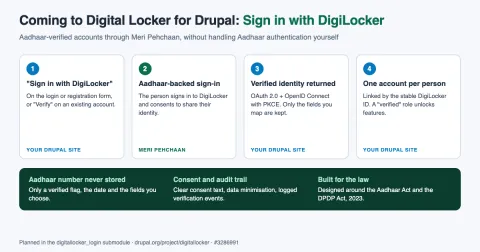
- Sign in with DigiLocker. Aadhaar-verified, one-person-one-account sign-in through Meri Pehchaan, the national single sign-on that sits alongside DigiLocker, without the site ever storing an Aadhaar number. Read the full plan.
- Drupal 12 readiness as soon as it is available.
The full roadmap, with the issues behind each piece of work, is in What's Next for Digital Locker in Drupal.
Get involved
If you are a university, training provider or government team using Drupal and DigiLocker is on your roadmap, I would love to hear about your use case. Try the 2.0.x branch, report what breaks, and share what you need in the issue queue. The code is on git.drupalcode.org, and the DigiLocker API specifications are published on API Setu.
If your organisation needs a DigiLocker integration built, extended or supported as part of a larger Drupal project, I work at Axelerant and am happy to connect you with the team. Get in touch.