Sign in with DigiLocker on Drupal: One Real Person, One Account
How do you know an account on your site belongs to a real, unique person? For a government portal, an exam board, a healthcare service, a marketplace or a dating site, that question decides whether the site can be trusted at all. In India there is already an answer most people carry on their phones: DigiLocker, the national document wallet, whose accounts are backed by Aadhaar.
I searched the Drupal ecosystem for a module that lets people sign in with DigiLocker, or verify an account with it, and found none. So I built one. Digital Locker 2.1.0, which I co-maintain, now includes Digital Locker Login.
What it does
- Sign in with DigiLocker on the login and registration forms.
- Verify with DigiLocker on an existing account, from a DigiLocker tab on the user's profile.
- One person, one account. A DigiLocker account can verify only one account on the site. A second account trying the same DigiLocker identity is refused.
- Aadhaar-backed only, if you want. Optionally refuse DigiLocker accounts that hold no eAadhaar data.
- A verified role. Grant a role on verification, for example to let only verified members send messages or post listings.
- A "Verified with DigiLocker" badge you can show on profiles. It never shows personal data.
How it works
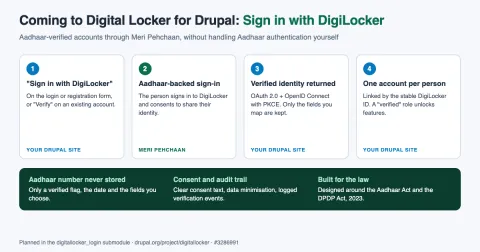
- The user clicks Sign in with DigiLocker, or Verify with DigiLocker.
- They sign in to DigiLocker, which shows your service name and purpose and asks for their consent.
- DigiLocker sends them back with an authorization code. Drupal exchanges it, using OAuth 2.0 with PKCE, for the DigiLocker ID, the name on the account and whether it is Aadhaar-backed.
- Drupal signs in the account already linked to that identity, creates a new verified account if you allow it, or marks the current account as verified.
- The DigiLocker access token is revoked straight away. Nothing else is requested.
What is stored, and what is not
| Stored | Never stored |
|---|---|
| The account ID | The Aadhaar number, full or masked |
| A keyed HMAC-SHA256 hash of the DigiLocker ID | The DigiLocker ID itself |
| The verification date | Date of birth, gender, mobile number, email |
| DigiLocker access or refresh tokens |
The hash lets the site recognise the same person again without keeping their identifier. The hashing key and the client secret live in settings.php, never in exported configuration. Users and administrators can remove a verification, and deleting an account removes its link.
Why DigiLocker, and not Aadhaar directly
It is tempting to think a site could simply "use Aadhaar". It cannot. Direct authentication with UIDAI needs Central Government approval for private entities, and Aadhaar's offline verification needs registration with UIDAI as an Offline Verification Seeking Entity. DigiLocker sign-in, through the Meri Pehchaan service, is the route open to registered DigiLocker partners. The module does not perform Aadhaar authentication itself. It relies on DigiLocker, which shows the user your purpose and asks for consent, and it keeps only the minimum data, in line with the Aadhaar Act and the Digital Personal Data Protection Act, 2023. This is not legal advice, so check your own obligations before going live.
Set it up
composer require drupal/digitallocker
drush en digitallocker_login
- Register as a requester on the DigiLocker partner portal to get a client ID and secret.
- Add the secret, and ideally a dedicated hashing key, to
settings.php. - Under Configuration > People > Digital Locker Login, register the redirect URI shown there with DigiLocker, then set the client ID, service name, purpose, verified role and whether a first sign-in may create an account. New accounts follow your site's own registration settings, including administrator approval.
- Grant Verify own account with DigiLocker to the roles that may verify.
The module works with Drupal 11.2 or later, and with Drupal 12 since version 2.1.1. The rest of the Digital Locker suite lets sites issue signed certificates to DigiLocker and lets users attach documents from their DigiLocker account.
Feedback welcome
If you run a DigiLocker partner integration, I would especially like to hear how the sandbox and production onboarding went for you, and what else would help, such as fetching verified documents or age checks without storing the date of birth. Open an issue in the Digital Locker issue queue.
If you are building a Drupal site in India that needs trusted, verified users, I am happy to help you plan it, and to connect you with my team at Axelerant to help you reach your goal. Get in touch.