Drupal AI in 2026: A Practical Guide to the AI Module, Providers, Agents and Guardrails
If you search for "Drupal AI" today, you find announcements, release notes and agency pages, but not much that explains how the pieces fit together. This guide does that. It is the written companion to my walkthrough of the Drupal AI Initiative, and it is based on contributing to the initiative and co-maintaining the Azure AI provider.
What is Drupal AI?
Drupal AI usually means two things:
- The AI module (
drupal/ai), a community-maintained contrib module that gives Drupal one common layer for working with AI models. The current stable release is 1.5.3, for Drupal 10.5+ and 11.2+. - The Drupal AI Initiative, launched in 2025, a coordinated effort to make AI a first-class part of Drupal. It funds and organises the work on the AI module, AI Agents, guardrails and AI in Drupal Canvas and Drupal CMS.
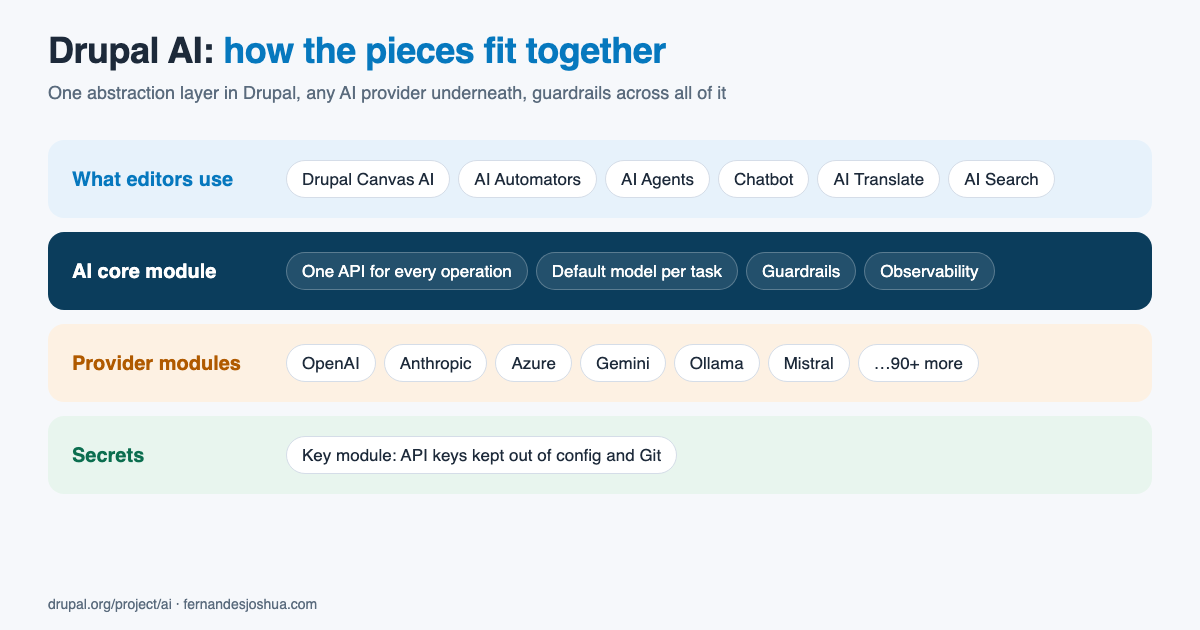
The key idea is that Drupal talks to AI through one API, and the provider is a setting. A feature written against the AI module works with OpenAI, Anthropic, Azure, Gemini, a local Ollama model or any of the 95+ supported platforms, without changing code.
How the pieces fit together
1. The AI core module
The core module defines operation types: chat, embeddings, text to image, text to speech, speech to text, moderation and more. Each one has a standard input and output, so a feature asks for "a chat completion" rather than "a call to the OpenAI API". You choose a default provider and model for each operation type, so the whole site can switch providers in one place.
It also includes the AI API Explorer, a UI for sending test requests to any configured model and getting example code. That is the fastest way to check that a provider works.
2. Provider modules
Each AI platform is a separate module: ai_provider_openai, ai_provider_anthropic, ai_provider_azure, ai_provider_gemini, ai_provider_ollama and many more. A provider module translates the standard operations into that platform's API. You install only the ones you need.
3. The Key module
API keys are stored with the Key module, not in configuration. A key can come from an environment variable or a file outside the web root, so it never ends up in exported config or in Git.
4. Features built on top
- AI Automators fill in a field from other content: a summary from the body, tags from an image, alt text, a translation. They can run on save, in a batch or on cron.
- AI Agents run multi-step tasks that use Drupal's own tools, such as creating content types, fields or taxonomy terms from a plain-language request. Agents are set up in the UI, and the plan is for them to move into the AI core module in 2.0.
- Chatbots and assistants for site visitors or editors.
- AI Search adds vector-based semantic search through Search API.
- Drupal Canvas lets editors build pages from components in plain language. I show this in building a Drupal page with AI using your own component library.
5. Guardrails and observability
Guardrails, added in 1.3, check what goes into and comes out of a model: blocking topics, removing personal data, or rejecting output that does not meet a rule. Since 1.4 they can apply to every AI call on a site, not only to one feature, and they also work with streamed responses.
AI Observability logs requests in detail, with OpenTelemetry support, so you can see what was sent, what came back, how long it took and what it cost. Both matter as soon as AI touches content that real people read.
What changed in AI 1.5
If you set up Drupal AI a year ago, the biggest change is that it is being split up. In 1.5, five submodules moved into their own projects: AI Content Suggestions, AI Logging, AI Translate, AI Validations and Field Widget Actions. AI Search also has its own release cycle now. The bundled copies only get security fixes, and new work happens in the standalone projects. The AI CKEditor submodule is deprecated in 1.5.
For a site, that means checking your composer.json when you upgrade: if you use one of those features, require the standalone project as well.
Setting up Drupal AI: a 10-minute start
- Install the AI module, a provider and Key.
composer require drupal/ai drupal/ai_provider_openai
drush en ai ai_provider_openai key ai_api_explorer
Swap
ai_provider_openaifor the provider you use, for exampleai_provider_azureorai_provider_anthropic. - Add your API key under Configuration > System > Keys. For production, use the environment variable or file provider rather than storing the key in the database.
- Configure the provider under Configuration > AI > Provider settings, and select the key you created.
- Choose default models under Configuration > AI > AI default settings, for example one model for chat and another for embeddings.
- Test it in the AI API Explorer. If a chat request works there, every feature that uses the default chat model will work too.
Calling Drupal AI from your own code
Custom code goes through the same layer, so it automatically uses whatever provider the site is configured with:
use Drupal\ai\OperationType\Chat\ChatInput;
use Drupal\ai\OperationType\Chat\ChatMessage;

$ai = \Drupal::service('ai.provider');
$default = $ai->getDefaultProviderForOperationType('chat');
$provider = $ai->createInstance($default['provider_id']);

$input = new ChatInput([
  new ChatMessage('user', 'Summarise this article in one sentence: ' . $body),
]);
$output = $provider->chat($input, $default['model_id'], ['my_module']);
$summary = $output->getNormalized()->getText();
The last argument is a list of tags. Guardrails, logging and observability use them to tell which feature made the call, so give each feature its own tag.
Choosing a provider
- OpenAI or Anthropic directly: the simplest start and the newest models.
- Azure AI: when an organisation needs its data to stay in a chosen region under an enterprise agreement. The Azure provider supports chat, embeddings, images and speech, and the Responses API.
- Ollama or another local model: when nothing may leave your own servers, at the cost of running the hardware.
- More than one: nothing stops you from using a cheap model for automators and a stronger one for agents. Since 1.4, the AI module can also fail over to another provider.
The honest trade-offs
- It moves fast. Modules are being split, renamed and deprecated between minor releases. Read the release notes before upgrading.
- Provider limits are real. Rate limits and costs show up quickly once automators run in bulk. Use batch and cron modes, and watch the observability logs.
- Community review takes time. Contributions go through public review, which is slower than a vendor shipping a feature, and is also why the result can be trusted.
- Drupal is still Drupal. AI does not remove the need to understand content models, permissions and caching. It makes a well-built site more useful, not a badly built one better.
Watch the walkthrough
The video covers the initiative itself: how I joined it, how the contributor teams work, Drupal Canvas, and two real community stories, including building the AI empathy module.
Where to go next
- The AI module project page and its documentation.
- The
#aichannel in Drupal Slack, where the contributors meet. - Drupal Canvas explained, the building blocks AI works with in Canvas.
If your organisation is planning AI features on Drupal, from automators and search to agents with proper guardrails, I work at Axelerant and am happy to connect you with the team. Get in touch.